Puzzle making
How to Make Audio Puzzles With AI Voices: 7 Listening Games
Seven listening games you can build with text-to-speech, voice cloning and a voice changer, a script template for each, and the listening ladder that keeps them fair.
 HinToday Team Updated 10 min read
On this page
Almost every puzzle we cover at HinToday is something you look at: a letter grid, a map, a flag. Close your eyes, though, and a different kind of puzzle opens up. One that works in the car, on a walk, or for a friend who'd rather not squint at a screen.
Audio puzzles used to be a chore to make. You needed a quiet room, a decent microphone and the patience for twenty takes. AI voices remove most of that. You type a script, pick a voice, and the clip is ready to share.
This guide covers seven audio puzzle formats, a script template for each, and the listening ladder that keeps them fair. It's the companion to our guide on making picture puzzles with AI.
What you'll learn
- What makes an audio puzzle different from a visual one
- Seven listening games, from spoken riddles to guess-who voice swaps
- Script templates written for text-to-speech
- The four-step listening ladder for fair difficulty
- How to use voice cloning without crossing a line
What is an audio puzzle?
An audio puzzle is a guessing game you solve by listening. The clue is a sound clip instead of a picture or a grid: a spoken riddle, a phrase that sounds like something else, a word played backwards, or a voice you have to recognize.
The ear is easier to fool than the eye. When you read "ice cream", the spelling settles it. When you hear it, "I scream" is just as likely. Audio puzzles live in that gap.
They also take the screen away. That makes them a natural fit for long drives, for kids who can't read yet, and for players with low vision.
Why AI voices make audio puzzles easy
- No recording setup. Text-to-speech turns a typed script into a clean clip, with no room echo or fridge hum.
- Endless retakes. Change one word and regenerate. Nobody has to re-record the whole line.
- A consistent narrator. Every clip in a set sounds like the same voice, so the voice itself never becomes an accidental clue.
- Voices you don't have. A deep announcer for quiz night, a calm reader for a bedtime riddle, a bright voice for the kids' round.
What you need before you start
- An answer list. Ten answers make a good first batch. Short, common words make the easiest audio puzzles.
- An AI voice generator. The formats below lean on three tools: text-to-speech for scripts, voice cloning for narrating in your own voice, and a voice changer for disguising real recordings. AnyVoice covers all three in one place, so it's the tool we reference throughout.
- A free audio editor. Audacity is free and open source. Its Reverse and Change Tempo effects cover everything the listening ladder needs.
- Headphones and one test listener. Someone who hasn't seen the script.
7 audio puzzle formats you can make with AI
Each format comes with a script template. Swap the highlighted parts, paste it into your text-to-speech tool, and listen back before you share.
1. Spoken riddles
- Text-to-speech
- Easiest
- All ages
The classic. "What has keys but can't open a single lock?" A piano. Read aloud, a riddle gets a rhythm it never has on the page.
The trick is pacing. Give the listener a beat after the setup and a longer one before the question.
Script template
Here's today's riddle... [setup line]. ... [second line]. ... What am I?
Pro tip: ellipses and full stops are your pause buttons. Text-to-speech voices slow down at punctuation, so place it on purpose.
2. Sounds-alike puzzles
- Text-to-speech
- Easy
- Wordplay
Some phrases are twins by ear. "I scream" and "ice cream". "An ice-cold hour" and "a nice cold hour". "The stuff he knows" and "the stuffy nose".
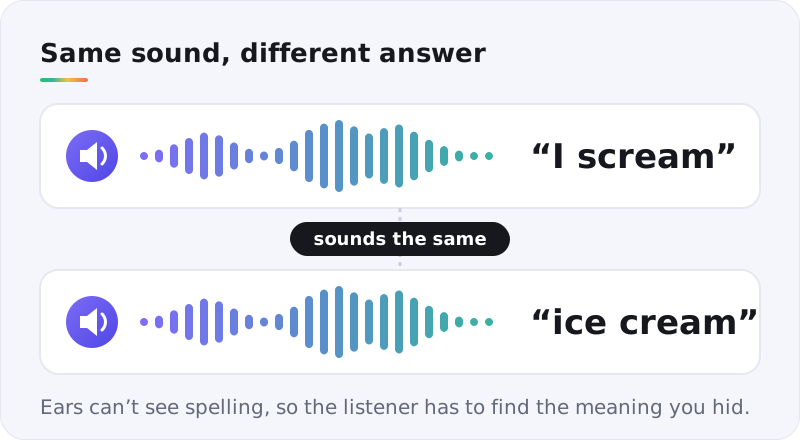
Play the clip and ask for the other meaning. It's the audio cousin of the picture rebus: the answer hides in how a thing sounds, not how it's spelled.
Script template
Listen closely... [sentence using the sound-alike phrase]. ... Now, what was I really talking about?
Note: pick a voice with plain, even delivery. A dramatic voice leans on one reading and gives the game away.
3. Backwards words
- TTS + audio editor
- Medium
- Party favorite
Generate a single word, reverse the clip, and share the backwards version. Players replay it, try saying it backwards themselves, and hear the real word surface.
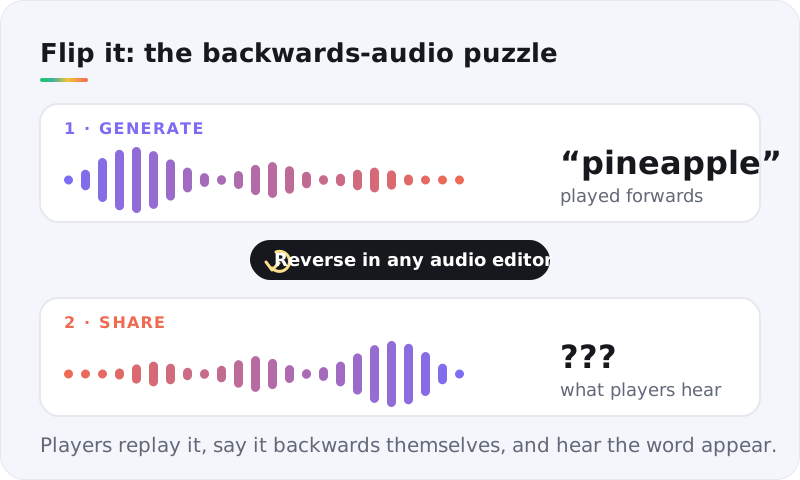
- Generate the word on its own, with no lead-in, so the reversed clip starts clean.
- Open it in your audio editor, select everything and apply Reverse.
- Share the backwards clip. Save the forward clip for the reveal.
Three-syllable words with crisp consonants work best: pineapple, telephone, octopus. Short, soft words turn to mush.
4. Guess the language
- Text-to-speech
- Medium
- Geography
One sentence, read in a language players have to name. It's Worldle for your ears, and fans of the daily Worldle and Globle games take to it fast.
If your text-to-speech tool reads several languages, write one simple sentence, translate it, and generate a clip for each.
Script template
Good morning. The weather is lovely today, and the market opens at nine. → [the same sentence, translated into the target language]
Check every translation with a native speaker or a reliable translator first. A clumsy sentence can make one language sound like its neighbor.
5. Anagrams by ear
- Text-to-speech
- Harder
- Word games
The voice reads out scrambled letters, one at a time, and players unscramble them in their head. It's Spelling Bee and Wordle energy with no letters on screen to stare at.
Script template
Unscramble these letters... [L]. [E]. [T]. [N]. [A]. [P]. ... That's [six] letters in all.
Put a full stop after every letter. Without it, voices can run letters together, and "B, E" starts to sound like "bee". (The example above spells PLANET.)
6. Guess who said it
- Voice changer
- Easy
- Friends & family
Everyone in the group answers the same question in one sentence, recorded in their own voice. Run every clip through a voice changer so they all sound like the same stranger, then play them back.
Players guess who's behind each answer from word choice, rhythm and the little habits a voice changer can't hide.
Question template
Answer in one sentence: [question, e.g. What would you order at a diner at 2 a.m.?]
Everyone records themselves and agrees to play. That's the whole point, and it keeps the game friendly.
7. Audio mysteries
- Voice cloning + TTS
- Harder
- Story lovers
A one-minute story with a single clue hidden in the narration. "The gardener said he'd been outside all evening, yet his boots were spotless after the rain." Players listen, then name the clue.
Voice cloning shines here. Clone your own voice once, and you can narrate a whole weekly series in your voice without recording every episode. Use stock text-to-speech voices for the other characters.
Script template
[Narrator, your cloned voice]: It was [time] at [place] when [event]. ... [Character voice]: "[line with the hidden clue]." ... [Narrator]: Who's not telling the truth, and how do you know?
The listening ladder: hints for the ear
Every daily puzzle on HinToday hides its answer behind hints that run from vague to specific. Audio puzzles need the same ladder, built from replays instead of crops.
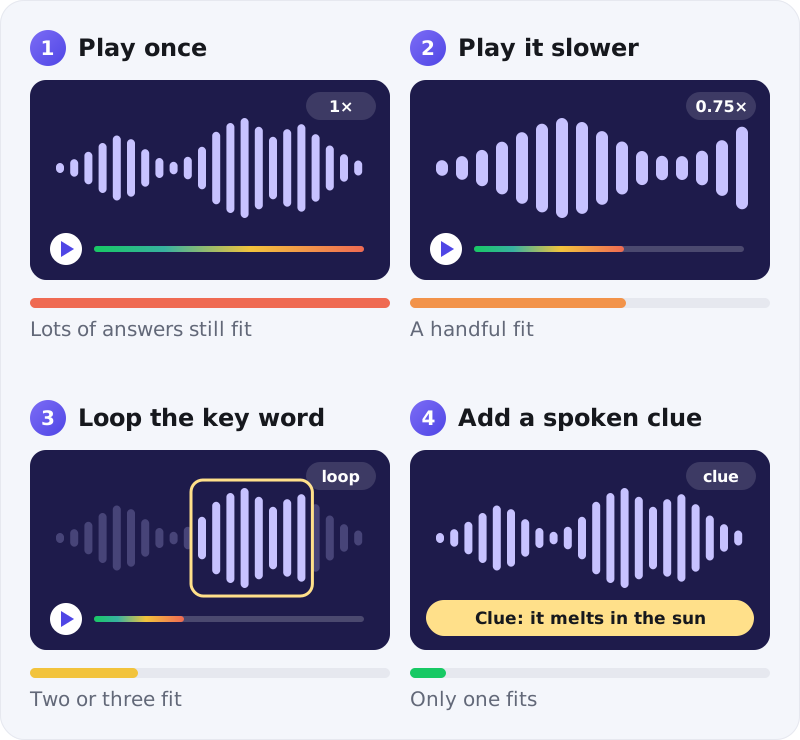
- Play once, at normal speed. Most listeners shouldn't get it yet.
- Play it slower. Lower the speaking rate and regenerate, or slow the clip with your editor's tempo effect.
- Loop the key word. Cut out the word or phrase that carries the puzzle and play it on its own.
- Add a spoken clue. One short line that narrows it to a single answer: "It melts in the sun."
The rules match our picture-puzzle ladder. Step one should stump almost everyone. Step four should leave almost nobody stuck. The original Heardle, the 2022 song-guessing game, ran on the same idea: one second of a song, then a little more after every miss.
Writing scripts for the ear
Text written for reading often trips a voice up. Five fixes cover most of it.
Spell out numbers and symbols
Write "nine thirty", not "9:30", and "percent", not "%". You decide exactly what gets said, instead of leaving it to the voice.
Respell names the way they sound
If a name comes out wrong, respell it phonetically in the script: "Shiv-awn" for Siobhan. Nobody sees the script. They only hear the result.
Watch words with two pronunciations
Read, lead, live, wind and bow each have two. Unless that ambiguity is the puzzle, rewrite the sentence so only one reading fits.
Keep clips under 20 seconds
If listeners need a replay just to remember the setup, the clip is too long. Get to the clue in the first few seconds.
Listen on a phone speaker
Most people will hear your puzzle through a phone. Make sure the key word survives a tiny speaker before you share.
Put together, most scripts follow one shape:
Master template
[Intro line]... [clue line one]. ... [clue line two]. ... [the question]?
Voice cloning, done right
Voice cloning is the most powerful tool in this kit, and the one that needs a rule. Ours is simple.
Only clone a voice that's yours, or one whose owner has said yes. No friends as a prank, no celebrities, no politicians.
Inside that rule, cloning is a gift for puzzle makers. You can narrate a weekly audio mystery in your own voice, fix a fluffed line without re-recording, and keep a whole series sounding like you.
When you post clips publicly, say the voice is AI-generated. It costs one line and keeps your listeners' trust.
Our workflow, start to finish
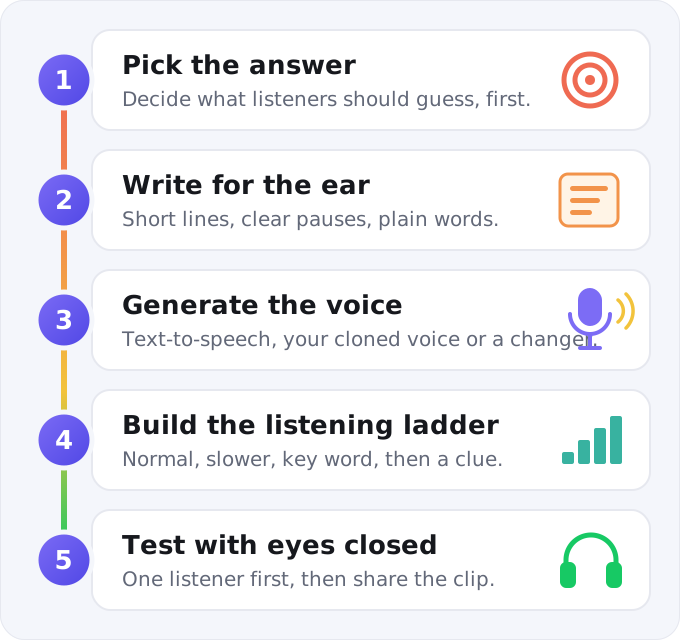
- Pick the answer first, so the script serves the puzzle.
- Write for the ear, using the five fixes above.
- Generate the voice. Paste the script into an AI text-to-speech tool like AnyVoice, narrate with your cloned voice, or run real recordings through the voice changer.
- Build the ladder: normal clip, slow clip, key-word loop, clue line.
- Test with eyes closed. One listener, no screen, no script.
Try it tonight: paste "Here's today's riddle... What has keys but can't open a single lock?" into a text-to-speech tool, generate it, and drop the clip in your group chat. Hold the answer until everyone has guessed.
5 mistakes that make audio puzzles unfair
1. The voice mispronounces the answer
If the AI says the key word wrong, the puzzle breaks. Listen to every clip all the way through, and respell anything that comes out wrong.
2. It's too fast
A natural reading pace is often too quick for a puzzle. Slow the voice a notch for the first play.
3. The delivery gives it away
A dramatic pause or heavy stress just before the key word tells listeners where to look. Keep the delivery even and let the words do the work.
4. The clip is too long
Trim the intro. Every second before the clue is a second the listener spends forgetting the setup.
5. Someone's voice was used without asking
The one mistake you can't fix in an editor. See the rule above.
Where to use your audio puzzles
- Road trips. A riddle every ten miles beats "are we there yet?"
- Classrooms. Sounds-alike puzzles show that spelling and sound don't always match, which makes them great listening practice for language learners.
- Podcasts and streams. A 30-second puzzle segment, with the answer at the end of the episode.
- Low-vision friends. Or anyone who wants a puzzle without a screen.
- Group chats. Post the voice note in the morning and the answer at night, the same rhythm as the daily games we cover.
Wrapping up
Write for the ear, keep the delivery even, and reveal the answer one replay at a time. Start your first audio puzzle with a spoken riddle: it takes a few minutes from script to clip.
If you'd rather see your clues than hear them, our guide to making picture puzzles with AI covers the visual side, and turning photos into video puzzles covers clues that move. And when it's time to solve instead of build, today's Connections hints and Contexto answer are a tap away.