Puzzle making
How to Turn Photos Into Video Puzzles With AI: 7 Motion Games
Seven puzzle games you can build by turning a still photo into a short AI video, the four-part motion prompt formula, and the replay ladder that keeps them fair.
 HinToday Team Updated 10 min read
On this page
Our first two guides covered puzzles you look at and puzzles you listen to. This one sits in between: a photo that moves.
Image-to-video AI takes a single still picture and turns it into a short clip. For a puzzle maker, that's a quiet superpower. The picture stays exactly yours, with your framing and your details, and you decide what moves.
That's where the clue lives. In a motion puzzle, the answer hides in what moves, how it moves, or what happens next. Below are seven video puzzle formats, a prompt formula that keeps the motion under control, and the replay ladder we use to keep things fair.
What you'll learn
- What a motion puzzle is, and why a photo beats a blank prompt
- Seven video puzzle games, from spot-the-motion to guess-the-year
- A four-part motion prompt formula you can reuse on any photo
- The replay ladder for fair, tunable difficulty
- The AI glitches that ruin a clip, and how to catch them
What is a motion puzzle?
A motion puzzle is a short video puzzle whose clue is movement. The scene is a real photo brought to life by AI, and players have to notice what moves, predict what happens next, or work out what they're looking at as the camera travels.
The idea has roots. A cinemagraph, a still photo where one small element moves in a loop, has been stopping people mid-scroll for more than a decade. Image-to-video tools make one in minutes instead of an afternoon of masking.
The puzzle part is a simple twist: you choose the movement so that it carries an answer.
Why start a video puzzle from a photo, not a text prompt
Text-to-video invents the whole scene. Image-to-video starts from a picture you choose. For puzzles, that difference matters.
| Text-to-video | Image-to-video | |
|---|---|---|
| Who picks the picture | The AI | You |
| Real places and objects | Invented | Your actual photo |
| Same scene across clips | Hard | Easy: reuse the photo |
| Best for | Imagined scenes | Puzzles built on real details |
If a puzzle depends on a specific detail, like the gap in a row of dominoes or the color of a front door, you want that detail fixed before the AI touches anything. For puzzles that need an invented scene, the text-to-video formats in our picture puzzle guide are the better fit.
What you need before you start
- Photos you own. Your camera roll is the best puzzle library you have. Busy, sharp, well-lit scenes with lots of small details work best.
- An image-to-video generator. ImgVeo does exactly this job: upload a picture and it turns it into a short video. For most formats below, that's the whole production step.
- A free video editor. Most free editors, CapCut and Shotcut among them, can trim a clip, change its speed and reverse it.
- One tester. Someone who hasn't seen the original photo.
7 video puzzle formats you can make from a photo
Each format comes with a motion prompt. Upload your photo first, then paste the prompt and swap the highlighted parts.
1. Spot the moving detail
- Easiest
- Busy photos
- All ages
Pick a busy photo. Animate exactly one small thing, such as a cat's tail, a curtain or a candle flame, and freeze the rest. Players watch the loop and point to what moves.
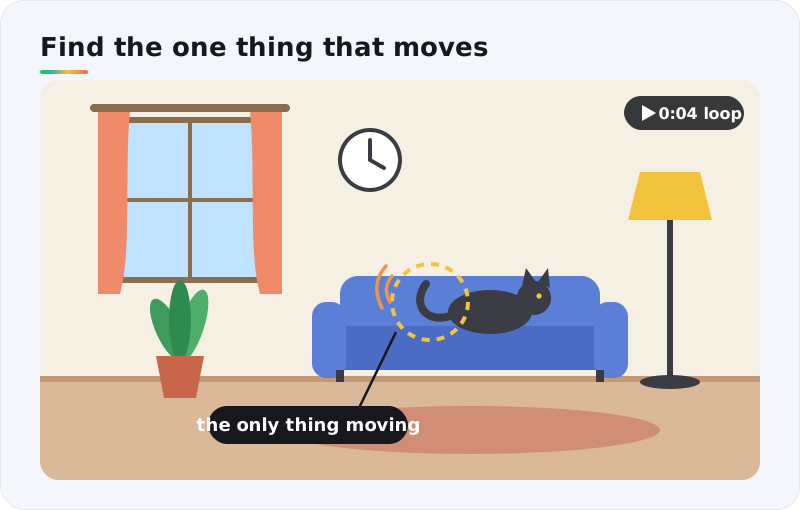
It's spot the difference, played in time instead of side by side. The smaller the moving thing, the harder the puzzle.
Motion prompt
Only the [small detail] moves: [gentle motion], seamless loop. Locked-off camera. Everything else in the photo stays completely frozen.
Pro tip: write "everything else stays completely frozen" every time. Image-to-video models like to add a little life everywhere, from drifting clouds to a breeze in the leaves, and every extra movement is a false answer.
2. What happens next?
- Medium
- Prediction
- Great for groups
Choose a photo of the moment just before something happens: a ball in mid-air, a cat crouched to jump, the first domino in a line. Animate the setup, stop the clip before the outcome, and ask players to call it.
Reveal the answer with a second clip that plays the moment through, or with the photo you took a second later.
Motion prompt
The [subject] begins to [action], slow and realistic, camera locked off. Stop before [the outcome].
Note: AI motion doesn't always obey physics. If a falling object floats or changes direction, regenerate. A prediction puzzle only works when the motion is believable.
3. Watch and recall
- Easy
- Memory
- Kids love it
Play a five-second clip once. Then ask questions. How many birds flew past? What color was the umbrella? Which window opened?
Pick a street or park photo with several small things that could move, and animate three or four of them.
Motion prompt
Gentle street life: [two birds fly across the sky], [an umbrella sways], [a window opens]. Steady camera, about 5 seconds.
Write your questions before you generate, then check every answer against the final clip. The AI may add a third bird you never asked for.
4. Guess the place
- Medium
- Geography
- Travel photos
Your travel photos, lightly animated. Motion adds clues a still can't: which side of the road the traffic drives on, how the flags move, whether the tide is going out. Fans of the daily Worldle and Globle puzzles will feel right at home.
Motion prompt
Subtle, realistic motion: [traffic moves along the road], [a flag waves], [people walk past]. Camera locked off, no new objects, no text.
Image-to-video can invent things, signs included. Ask for "no new objects, no text", then check every frame. An invented shop sign in the wrong language sends players to the wrong country.
5. The reverse zoom
- Medium
- Video editor
- The big reveal
This is the most satisfying video puzzle to watch, and it runs on a trick. Ask for a slow push-in from your full photo to one small detail. Then reverse the clip. Now it opens on a mystery close-up and pulls back to reveal your real photo.
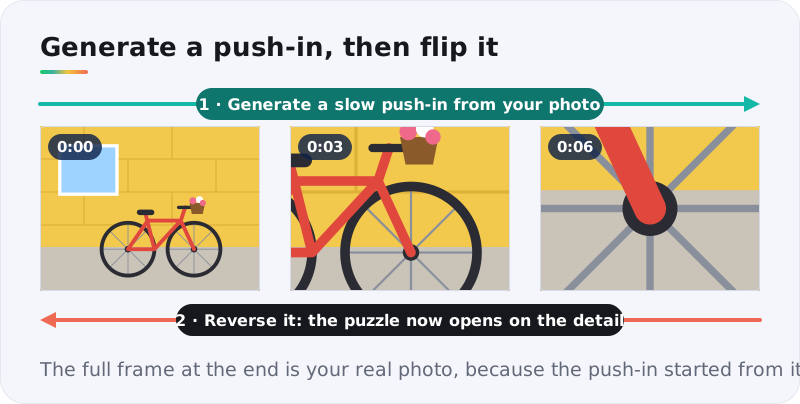
Why not just ask for a zoom-out? Because a zoom-out would begin on a close-up the AI has to invent. A reversed push-in starts from your real photo, so the reveal frame is always true.
Motion prompt
Slow, smooth camera push-in from the full photo to a close-up of [small detail]. No cuts. Nothing else in the scene moves.
Then open the clip in your editor, apply Reverse, and export.
6. Odd motion out
- Harder
- Four clips
- Categories
Animate four photos. Three share a kind of motion and one doesn't. A ceiling fan, a bike wheel and a vinyl record all spin; a playground swing swings. It's Connections logic, sorted by movement.
Motion prompt
The [object] [spins / swings / bounces / drips] steadily at a realistic speed. Locked-off camera, everything else frozen.
Keep all four clips the same length and framing, so nothing but the motion gives this video puzzle away.
7. Guess the year
- Medium
- Old photos
- Family favorite
Dig out an old family photo and give it a little motion: hair in a breeze, a car rolling past, smoke from a chimney. Players guess the decade from the clothes, the cars and the colors. If you've played TimeGuessr, you'll recognize the game.
Motion prompt
Gentle, realistic motion: [hair moves in a light breeze], [the car rolls slowly forward]. Keep faces natural and unchanged. Camera locked off.
Ask the family before you animate relatives, and keep the motion small. Big movements on old faces can tip from charming to uncanny fast.
The motion prompt formula
Every prompt above follows the same four parts. Get them right and the AI stays on script.
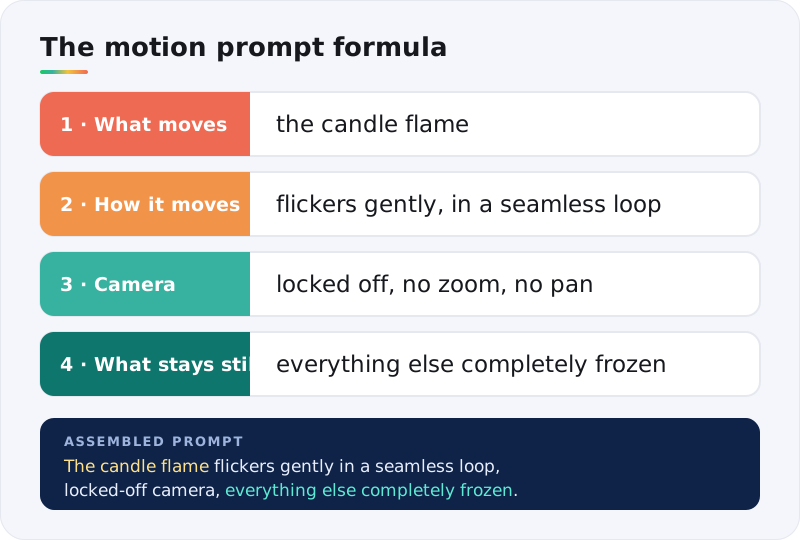
- What moves. Name one thing, and be specific: "the candle flame", not "the candle".
- How it moves. Speed and style: "flickers gently", "rolls slowly", "in a seamless loop".
- Camera. "Locked off" for spot-the-motion puzzles, "slow push-in" for reveals. One camera move per clip.
- What stays still. The part people forget, and the one that matters most. "Everything else completely frozen" stops the AI from animating your answer key.
The replay ladder: hints for a moving picture
Every daily puzzle on HinToday hides its answer behind hints that run from vague to specific. Video puzzles get the same treatment, built from replays.
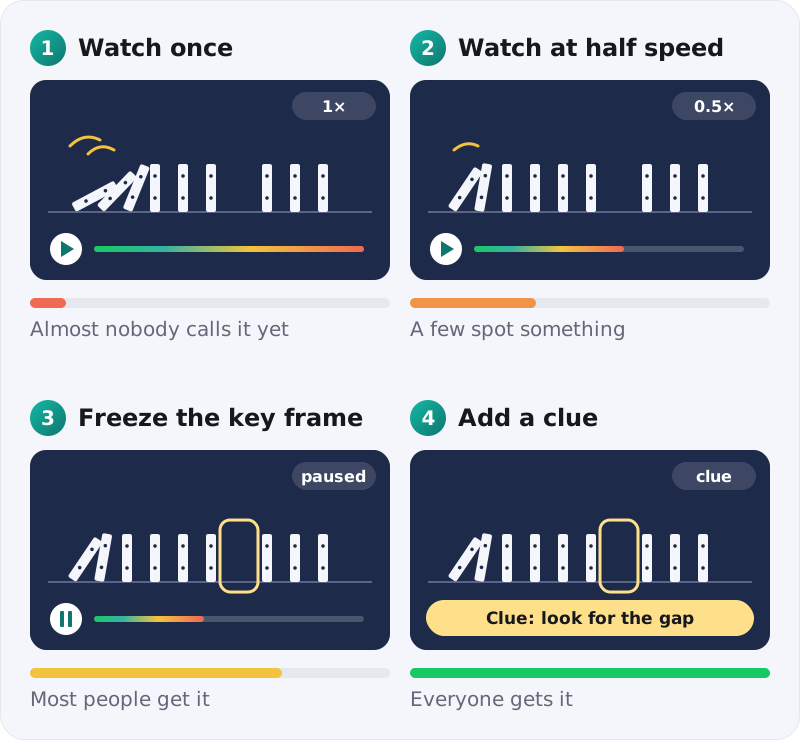
- Watch once, at full speed. Almost nobody should call it yet.
- Watch at half speed. Slow motion turns a blur into a clue.
- Freeze the key frame. Pause on the moment that matters, or share a screenshot of it.
- Add a clue. One line of text that leaves a single answer: "Look for the gap."
The rules match our picture and audio ladders. Step one should stump almost everyone. Step four should leave almost nobody stuck.
Our workflow, start to finish
- Pick the answer first. Decide what players should notice, predict or name.
- Choose the photo. Busy, sharp and well lit. The answer has to be in the picture before any motion is added.
- Write the motion prompt with the four-part formula.
- Generate. Upload the photo to an image-to-video generator like ImgVeo, paste the prompt and make three or four takes.
- Trim, test and share. Cut to the shortest clip that works, run it past one tester, then post it.
Try it tonight: take a photo of your living room, ask for "only the curtain moves, everything else completely frozen", and send the loop to your group chat with one question: what's moving?
5 mistakes that make video puzzles unfair
1. Everything moves
If the clouds drift, the leaves sway and the cat breathes, there's no single answer. Freeze everything you didn't ask for.
2. The AI changed your photo
Image-to-video can morph faces, add objects or warp text. Compare the first and last frames with your original, and regenerate if anything important changed.
3. The motion breaks physics
A ball that hovers or water that climbs uphill turns a prediction puzzle into a coin toss.
4. The clip runs too long
Most motion puzzles need three to six seconds. Longer clips leave more room for glitches and lose the group chat's attention.
5. The photo wasn't yours to animate
Use photos you took or have permission to use, and ask before you animate people, especially in old family photos.
Where to use your video puzzles
- Group chats. One loop in the morning and the answer at night, the same rhythm as the daily games we cover.
- Classrooms. Watch-and-recall clips build observation skills, and what happens next sparks a good physics chat.
- Family gatherings. Guess the year with the old photo albums.
- Social posts. A looping spot-the-motion clip makes people stop scrolling and look twice.
- Trip recaps. Turn a holiday album into a round of guess-the-place video puzzles.
Wrapping up
Start from your own photo, decide exactly what moves, and freeze everything else. That's the whole method. Spot the moving detail is the quickest first video puzzle to make.
This guide rounds out our make-your-own-puzzles series: picture puzzles for the eyes, audio puzzles for the ears, and motion puzzles for both. When you'd rather solve than build, today's Flagle answer and Tradle answer are a tap away.