Puzzle making
How to Make Picture Puzzles With AI: 7 Formats That Work
Seven picture puzzle formats you can build with an AI image and video generator, a prompt template for each, and the four-rung reveal ladder that keeps them fair.
 HinToday Team Updated 10 min read
On this page
Every day we write spoiler-safe hints for 11 daily puzzles here at HinToday. The visual ones, like Worldle's country silhouettes and Flagle's flags, work for one reason: the picture gives you just enough to start guessing, and never the whole answer at once.
Making your own picture puzzle used to mean hunting for a stock photo that happened to fit. AI image and video generators flipped that. You describe the scene, and the picture is built around your answer instead of the other way round.
This guide walks through seven picture puzzle formats you can make with AI, gives you a prompt template for each, and shows the reveal ladder we use to keep a puzzle fair.
What you'll learn
- What an AI picture puzzle is, and why it beats a stock photo
- Seven formats, from picture rebus to slow zoom-out video
- Copy-ready prompt templates you can adapt in seconds
- The four-rung reveal ladder for fair, tunable difficulty
- The mistakes that make AI puzzles unfair, and how to catch them
What is an AI picture puzzle?
An AI picture puzzle is a guessing game whose image is generated from a text prompt. You choose the answer first, then write a prompt that hides it in plain sight: as a rebus, a cropped detail, a scene or a short video clip.
That order is the whole trick. With a stock photo, you start with a picture and hope a good puzzle is hiding inside it. With AI, you start with the answer and build only the picture you need.
It also hands you control of the clues. You decide what sits in frame, what stays out, and how much each crop gives away. That control is what separates a fun picture puzzle from a frustrating one.
What you need before you start
The kit is short:
- An answer list. Ten answers make a good first batch. Concrete nouns are easiest: objects, animals, foods and places.
- An AI image and video generator. Any good one will do. AnyScene is a handy pick because it makes both still images and short video clips in one place, and two of the seven formats below need video.
- A basic photo editor. The one built into your phone can crop and blur, which covers everything the reveal ladder needs.
- One test player. Someone who hasn't seen the answer. You'll see why below.
7 picture puzzle formats you can make with AI
They're ordered roughly from quickest to most involved. Each one comes with a prompt template: swap the highlighted parts for your own answer.
1. Picture rebus
- Image
- Easy to make
- Word puzzle
A rebus spells a word or phrase with pictures that sound like its parts. A bee plus a leaf reads as "belief". A key plus a board is "keyboard". A star plus a fish is "starfish".
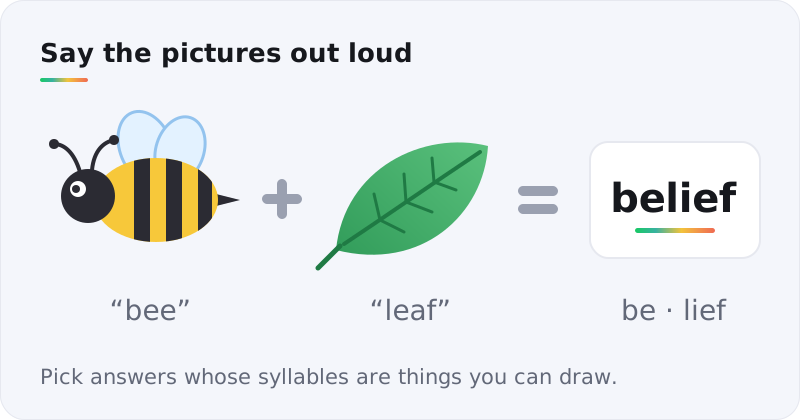
AI is good at this because each part is a simple, iconic object. The hard part is choosing the answer. You need a word whose syllables are drawable nouns.
Prompt template
Flat vector illustration of a single [object] on a plain white background, centered, bold outlines, soft colors, no text, no letters
Generate each part separately, then line them up with a plus sign between them.
Pro tip: keep every part in one style. If the bee is a cartoon and the leaf is a photo, players start reading the style instead of the picture.
2. Extreme zoom-in ("What is it?")
- Image
- Quickest
- All ages
Show a texture so close that the object disappears: the skin of an orange, the fuzz of a tennis ball, the bristles of a toothbrush.
It's the fastest picture puzzle to make. One prompt, one image, and the crop does the rest. Generate the whole object separately so the reveal picture is ready to go.
Prompt template
Extreme macro photograph of the surface of a [object], texture filling the entire frame, shallow depth of field, no background visible, no text
3. Guess the place
- Image
- Medium
- Geography
This is the Worldle and Globle idea moved into a photo: a scene that hints at a country through its landscape, buildings and light, with no landmark that gives it away. If you play the daily versions, our Worldle answer page and Globle hints show how shape and distance clues narrow the field step by step.
Prompt template
Wide photograph of a quiet residential street in [region], typical local architecture and plants, [season] light, no signs, no text, no flags, no famous landmarks
Note: AI blends regions. It may put the wrong trees or roof styles in a scene. Check the details against a real reference photo before you share, or your clues will point people the wrong way.
4. Spot the difference
- Image + edit
- Medium
- Kids love it
Generate one busy scene. Then make a copy and change five small things.
Don't generate the two pictures separately. Two runs of the same prompt never match closely enough, and players will find fifty differences instead of five.
Prompt template
Busy cartoon illustration of a [place: kitchen / market stall / beach], lots of small objects, clean outlines, even lighting, no text
For the edits, use your editor's clone or erase tools, or an AI edit if your generator offers one. Recolor an object, remove one, flip a small item. Note each change as you go: that list is your answer key.
5. Odd one out
- Image × 4
- Medium
- Wordplay
Show four pictures. Three share a hidden link and one doesn't. It's the Connections idea in picture form, and our Connections hints page shows how the official game layers its traps.
Example: a piano, a map, a padlock and a drum. The piano, the map and the padlock all have keys. The drum doesn't.
Prompt template
Photograph of a single [object] on a plain light-grey background, soft studio lighting, centered, no text
Use the same prompt for all four so nothing changes but the object. If three are photos and one is a drawing, the style gives the answer away.
6. Slow zoom-out video
- Video
- Medium
- Great on a TV
The video version of the zoom-in. The clip opens on a tiny detail and pulls back until the whole scene is clear. Framed, the daily movie game, runs on the same idea with film stills: six guesses, and a new frame after every miss.
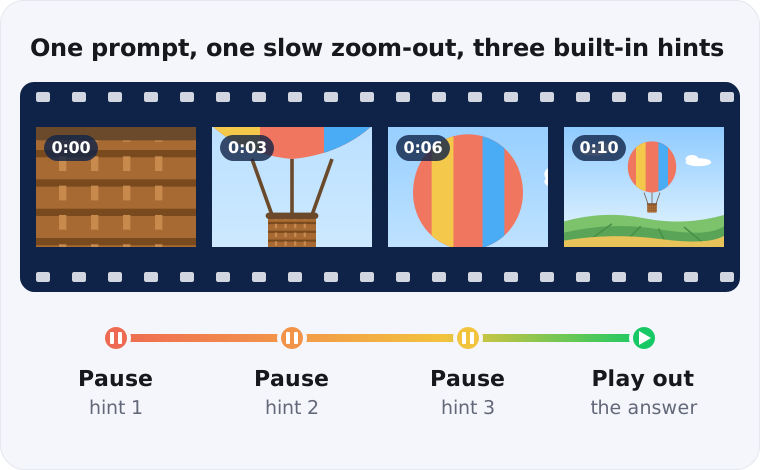
You pause the clip at three points, and each pause is a hint. Playing it out is the reveal. One clip gives you the whole ladder.
Prompt template
Slow continuous camera pull-back, starting on an extreme close-up of [detail] and ending on a wide shot of [full scene], smooth motion, no cuts, no text, 10 seconds
Video models don't always honor the opening frame. Generate a few takes and keep the one whose first second gives the least away. Want the reveal to land on a real photo instead? Try the reverse zoom, built from your own picture.
7. Idiom scenes
- Image or video
- Harder
- Language learners
Show a common phrase literally and ask for the phrase. A cat stepping out of a paper shopping bag: "let the cat out of the bag". An elephant sitting on a living-room sofa: "the elephant in the room".
Video makes this format sing. A short clip of someone knocking a jar of beans across a dinner table plays like a game of charades.
Prompt template
Short cinematic clip of [literal action], realistic, natural light, everyday setting, no text, no captions
Pick idioms your players actually use. A phrase they've never heard isn't a puzzle. It's trivia.
The reveal ladder: how to make any picture puzzle fair
On HinToday, every daily puzzle gets hints that run from vague to specific, with the answer behind a final tap. The same structure works for a picture puzzle. We call it the reveal ladder.
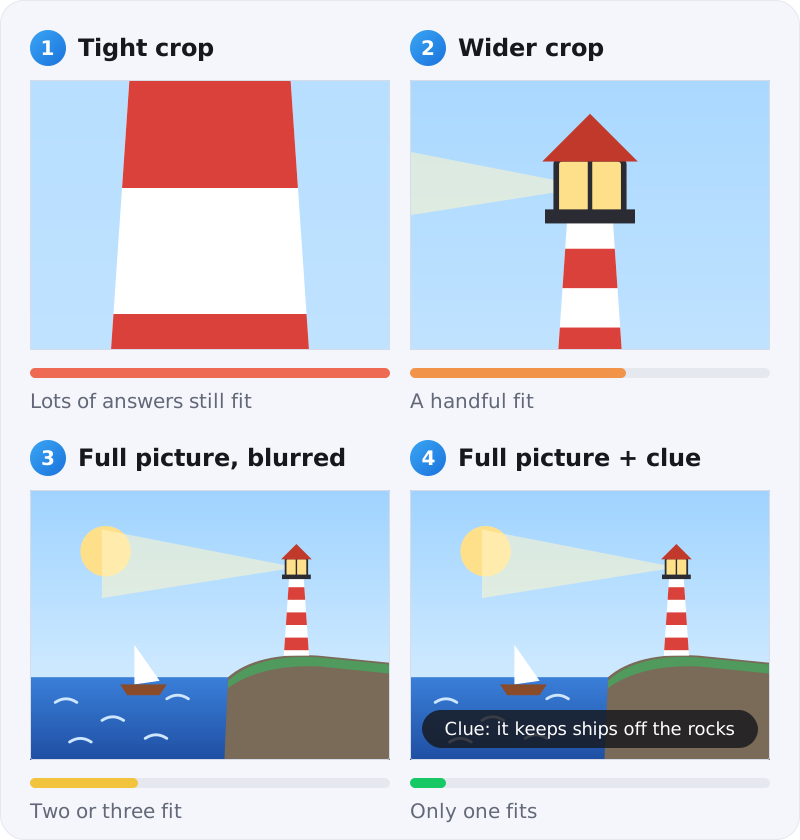
- Tight crop. About a tenth of the image. Lots of answers should still fit.
- Wider crop. Enough to see shape or context. A handful of answers fit.
- Full picture, blurred. The layout shows, the detail doesn't. Two or three fit.
- Full picture plus one text clue. Only one answer fits.
Two rules keep it honest. Rung one should stump almost everyone. Rung four should leave almost nobody stuck. If your tester solves it on rung one, crop tighter. If they're still lost on rung four, the picture or the clue is the problem, not the player.
Tuning the difficulty
Three dials do most of the work: how familiar the answer is, how small the first crop is, and how direct the clue is.
| Level | Answer | First crop | Final clue |
|---|---|---|---|
| Easy | Everyday object | About a quarter of the frame | Names a use ("you drink from it") |
| Medium | Specific object or place | About a tenth | Names a category ("found on the coast") |
| Hard | Idea, idiom or region | A sliver, under a twentieth | Wordplay ("sounds like…") |
How to write prompts that hide the answer
The prompt names the answer. The picture shouldn't shout it. Five habits help.
Ban text, every time
Add "no text, no letters, no labels, no logos" to every prompt. Image generators love writing words into pictures, and the word they pick is often your answer.
Lock one style per set
Choose a style phrase, such as "flat vector illustration, soft pastel palette", and reuse it across the whole set. Shifts in style turn into accidental clues.
Describe the frame, not just the thing
Phrases like "filling the frame", "seen from below" and "partly hidden behind a curtain" control how much the first look gives away. Framing is your difficulty dial at the prompt stage.
Generate four, keep one
Make several versions and keep the fairest one, not the prettiest.
Check the details
Zoom in before you share. Look for extra fingers, melted lettering, and flags or maps that are almost right.
Put together, every prompt follows the same shape:
Master template
[Style] of [answer], [framing], [setting], [lighting], no text, no letters, no logos
For the lighthouse in the reveal ladder above, that becomes: "Flat vector illustration of a lighthouse, seen from below so the tower fills the frame, rocky coast at dusk, soft warm light, no text, no letters, no logos."
Our workflow, start to finish
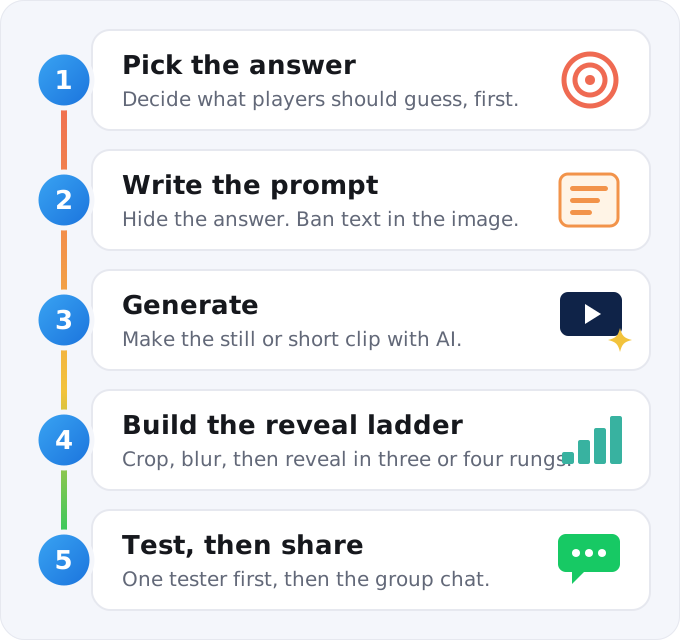
- Pick the answer. Write it down before anything else, so the picture serves the puzzle and not the other way round.
- Write the prompt using the master template above.
- Generate. Paste the prompt into an AI image and video generator like AnyScene, or describe a short clip for the two video formats. Make three or four takes.
- Build the ladder. Export a tight crop, a wider crop and a blurred copy.
- Test on one person, fix what confused them, then share it with everyone.
Try it tonight: copy the zoom-in template above, swap in "pineapple", and generate it. Crop the result to a tenth of the frame and send it to the friend who always solves the Wordle first.
5 mistakes that make AI picture puzzles unfair
1. The answer is written in the picture
Generators sneak words onto signs, labels and book spines. Zoom in on every one before sharing, even if your prompt said "no text".
2. The AI got a fact wrong
Flags are the classic case. A generator can draw a flag that's almost right: wrong star count, stripes in the wrong order. Anyone who plays Flagle knows how small the gap between two real flags can be, so check against an official reference.
3. Glitches become red herrings
A six-fingered hand or a melted clock face sends players down the wrong path. They'll assume every odd detail is a clue. Regenerate rather than explain.
4. The landmark is too famous
One glimpse of the Eiffel Tower ends a guess-the-place round. Use ordinary streets, markets and countryside, where the clues are in the details.
5. Rung one is a giveaway
If your tightest crop shows the most distinctive part, start somewhere else. For the lighthouse, the stripes are a better opener than the lantern.
Where to use your picture puzzles
- Group chats. Post one each morning and the answer each evening, the same rhythm as the daily games.
- Classrooms. A rebus or an odd-one-out makes a five-minute warm-up. Idiom scenes are gold for language learners.
- Quiz and game nights. Slow zoom-out clips make a strong picture round on a big screen.
- Your own daily puzzle. If your group warms to it, plan answers a month ahead. That's how the daily games we cover stay consistent from one day to the next.
Wrapping up
Start with the answer, hide it on purpose, and reveal it one rung at a time. That's the whole method, and it works the same whether you're drawing a rebus or cutting a ten-second clip. For puzzles people hear instead of see, read our guide to making audio puzzles with AI voices.
Pick one format tonight. The zoom-in is the quickest win. And when you'd rather solve than build, today's Wordle hints and Strands answers are waiting, spoilers safely behind a tap.